
H-E-B Impact analysis
UI/UXH-E-B Impact analysis
Overview
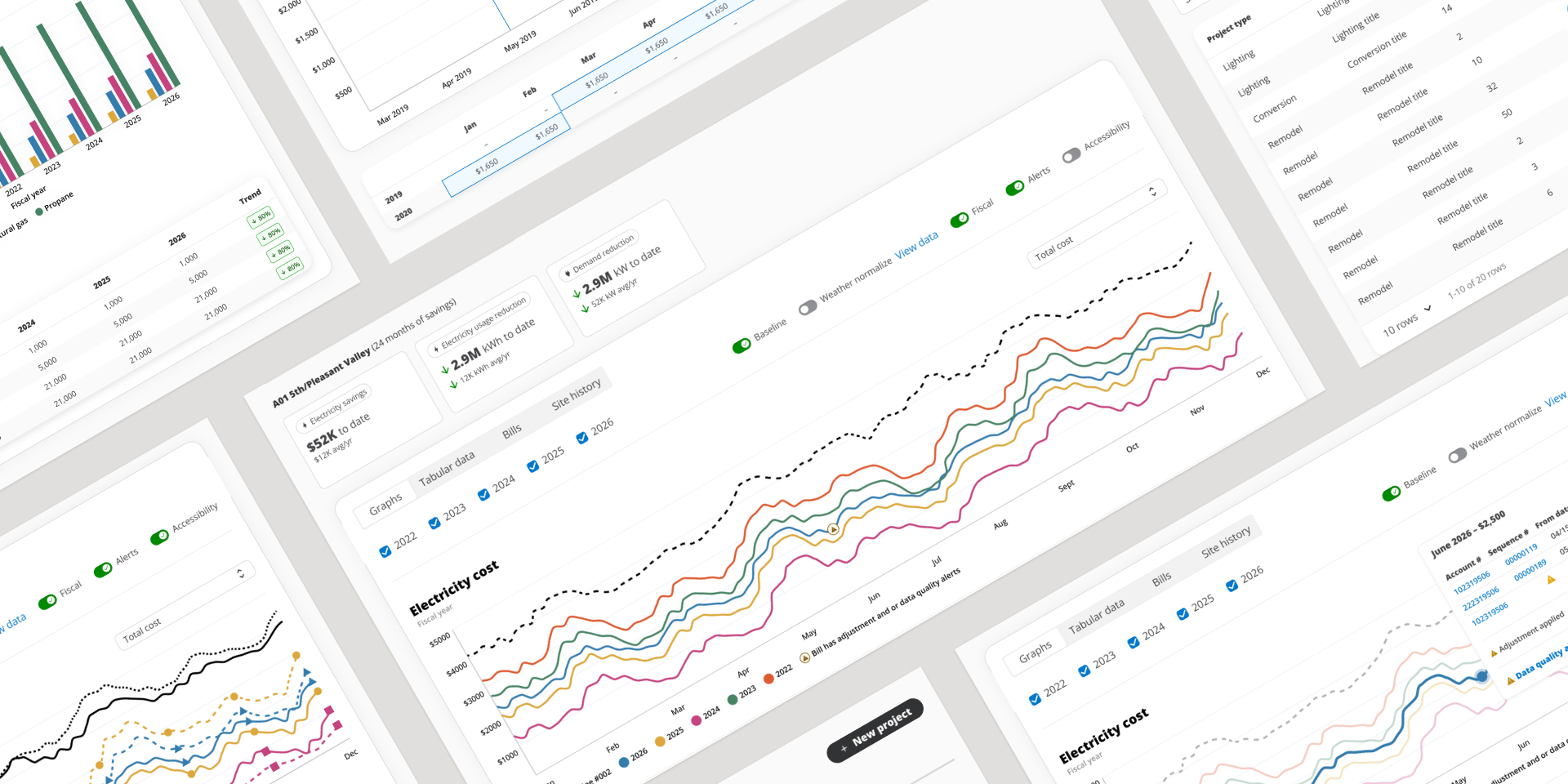
When an enterprise spends millions on utility bills across hundreds of locations, operational changes—like retrofitting LED lighting or upgrading HVAC systems—can yield massive savings. At H-E-B, all utility data and bills are managed through an internal platform called Greensights. Within this system, Impact Analysis helps answer a fundamental question: Did it actually work? It measures project performance by comparing utility usage and cost before and after an initiative.
ROLE
Lead Product Designer
TIMEFRAME
6 months
COMPANY
H-E-B
INDUSTRY
Grocery
The challenge
A lean team of just 15 analysts is responsible for monitoring utility performance and managing millions of dollars in utility spend across 450+ H-E-B locations. Evaluating project performance was trapped across disjointed tools and spreadsheets, leaving the team burdened by:
Time-consuming, manual analysis that was prone to human error.
Outdated reporting that lagged far behind real-time data.
Limited confidence when communicating ROI and outcomes to leadership.
The goal
Design a centralized enterprise workflow within Greensights that automates baseline tracking, simplifies complex data adjustments, and gives analysts a clear, data-backed view of energy efficiency projects.
Discovery: Navigating
a Complex Domain
Mapping Decisions, Information, and Blockers
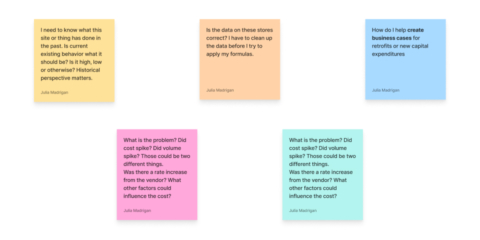
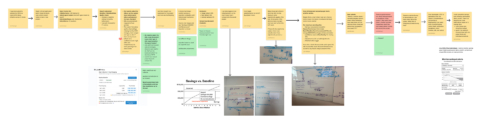
Through collaborative discovery exercises, we mapped out the decisions analysts needed to make, the information required to drive them, and the roadblocks in their way. This included charting out questions around historical baselines, cost versus volume spikes, vendor rate changes, and data cleanliness before formulas could even be applied.
Synthesizing Complex Domain Knowledge with AI
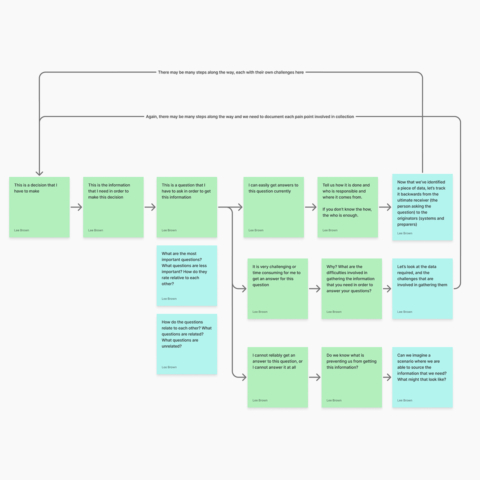
Absorbing deep utility management and financial rules meant facing a mountain of complex domain knowledge where every conversation felt like a foreign language. To make sense of it all, I used AI to analyze our discovery session notes and transcripts, identify key patterns, and synthesize complex learnings—which I then validated directly with users and stakeholders.
The Breakthrough: First-Person User Stories
The turning point came when I started writing user stories in the first person, stepping directly into the shoes of an analyst. By asking “What information do I need? What decisions am I trying to make? What happens next?”, I bridged the gap between raw data and UX logic, translating complex requirements into an intuitive step-by-step workflow that matched their real mental model
Collaboration & Shaping the PRD
I brought my first-person user stories and rough workflows into intensive whiteboarding sessions with the Product Manager and another Greensight’s designer. Collaborating closely allowed us to align rapidly, pressure-test our assumptions, answer complex edge-case questions, and directly shape the product requirements. For the first time, abstract data requirements transformed into a concrete, human-centered product roadmap.
Why I Still Sketch in the day of AI
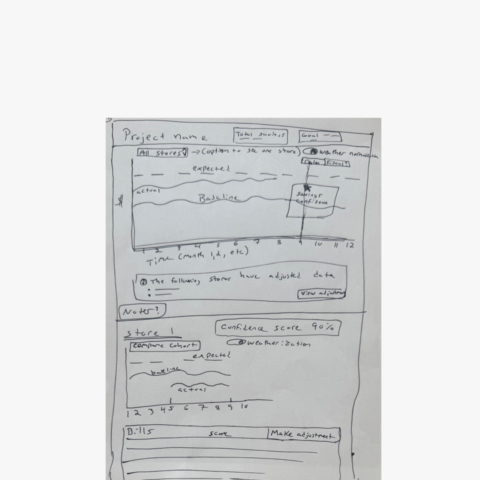
Before touching a single pixel in Figma, I always start on paper. Hand-drawn sketches allow me to rapidly test structural layouts, explore screen hierarchy, and catch workflow gaps when the cost of iteration is virtually zero.
By pairing low-fidelity sketches with first-person user stories, I establish a definitive point of view. This gives me a clear direction to guide AI effectively, ensuring the core UX logic is fully resolved before committing to high-fidelity designs.
Bringing the Screens
to Life & Early Testing
With clear user stories and sketches in place, I brought the concepts into high-fidelity designs in Figma. But putting screens on paper was just the starting line—the real learning began once we had interactive prototypes in front of our analysts to test workflows, uncover edge cases, and refine the experience in real time.
Rethinking Data Visualization
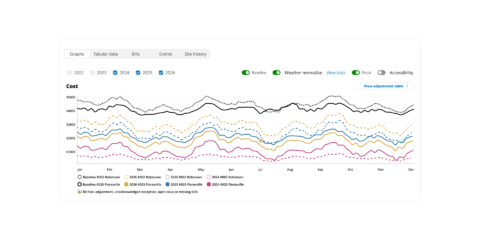
To figure out how analysts wanted to explore trends, I built multiple interactive prototypes in Figma with different chart controls. Seeing options side-by-side sparked an immediate realization: a standard linear timeline wasn’t working.
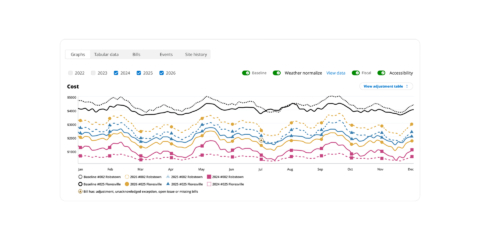
Analysts didn’t just want to zoom through continuous time—they needed a Year-Over-Year (YoY) overlay. Comparing January of one year directly against January of another allowed them to instantly spot seasonal norms versus real anomalies.
We also added a dedicated Accessibility mode—incorporating distinct shape markers along the series lines—to ensure data clarity for color-blind power users.
Refining Data Adjustments
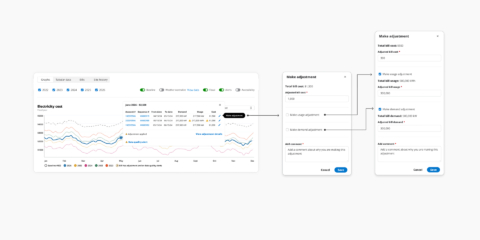
Analysts needed a way to manually adjust baseline graphs when abnormal events distorted data, ensuring financial and energy trends accurately reflected reality without altering official bills.
Even after stakeholders signed off on monthly-level adjustments, I tested deeper granularity. I asked if they needed to adjust by service type, and they agreed. Proactively pushing one step further, I brought them an even more granular option—adjusting at the individual bill level. That final option proved to be the exact tool they needed, preventing a massive architecture mistake before dev handoff.
Key Takeaways:
The Problem: Abnormal events distorted baseline data, and analysts needed a way to manually normalize those figures to reflect reality.
The Breakthrough: AProactively testing options beyond the approved scope revealed that adjustments needed to happen at the individual bill level, not by month or service type.
The Pivot: Proactively testing progressively granular options (from monthly $\rightarrow$ service type $\rightarrow$ individual bill) uncovered their true underlying need.
What we built
We brought together complex utility logic, flexible Year-Over-Year visualizations, and granular bill-level adjustments into an intuitive, high-density dashboard. By giving analysts precise control over baseline data, the platform empowers teams to accurately forecast energy trends, optimize capital expenditures, and protect millions in long-term savings.
Learnings &
Key Takeaways
Domain Expertise Demands Deep Interrogation: Approval from stakeholders doesn’t always equal accuracy. Pushing past surface-level consensus with targeted edge-case questions saved us from building on incorrect data assumptions.
Low-Fidelity Logic Drives AI & High-Fidelity Design: Establishing a strong structural point of view through hand-drawn sketches and first-person stories allowed me to guide AI and Figma exploration with clear intent rather than trial and error.
Show, Don’t Ask, for Latent User Needs: Analysts couldn’t articulate their need for a Year-Over-Year overlay until they interacted with side-by-side prototypes—proving the value of rapid, interactive exploration over passive interviews.